As I had learned about the Project Management, here is a short note on Project Management theory and its classes. This article is purely for my revision purpose, so readers may feel it like incomplete article, my apologies for that.
Project Management:
Projects are defined as complex efforts, made up of interrelated tasks, to be completed within a limited time frame and budget, with a well-defined set of objectives.
Project Management is define as the process of managing and directing the efforts and resourse (time, materials, personnel, finance) through the project life cycle to complete a particular project in an orderly and economic manner; and to achieve the project objectives to the satisfaction of the project’s major stakeholders.
A successful Project Manager must simultaneously manage the four basic elements of Project
>> Resources
>> Time
>> Cost
>> Scope
Project Life Cycle:

Class:
1. Project Management Overview: Projectisation & Scope
2. Project Life Cycle feasibility analysis & a case study experience
3. Network based Project Planning & Scheduling
4. Resource Allocation & scheduling
5. Project risk assessment & management
6. Project Procurement, Material & SCM(Software configuration Management)
7. Project Evaluation & Finance related issues
8. Project Contracts, Arbitration & Dispute Settlement Mechanisms
9. Project Total Quality Management
10. Introduction to MS Project
11. Introduction to Primavera
12. Theory of Constraints & Project management Experience
13. Project Human Resource Management
14. Case Studies
Learnings:
1. Describe the special characteristics of project, and their implications
2. Describe the major project management functions and the skills required
3. Major project management techniques
4. With case studies, realistic expectation of how to learn to become effective project manager
5. Understand the role of good project planning, and basic planning framework
6. Understanding the common mistakes made in project planning
7. Understanding and differentiate the CPM (Critical Path Method) and PERT (Program Evaluation Review Technique) technique in scheduling, their development, applications and limitations
8. Prepare a schedule for project activities, with or without resources constraints, possibly using Excel and MS Project software or Primavera
9. Use CPM method to analyze the time and cost trade-off
10. Address some scheduling problems facing task duration uncertainty
11. Define the elements and roles of project control during the implementation phase
12. Describe the frameworks for project control
13. Monitor project progress
14. Use the earned value method to manage project’s cost and schedule
 ‘Avatar’….yes a movie which is creating history right now. After ‘Lord of the Rings triology’ this is another movie which is responsible for changing the film and entertainment industries perspective, I also want to add game industry into it because game industry will get a huge benefit from technologies which ‘Avatar’ develops.
 depth, making objects appear to be in front of or behind the cinema screen. The technique relies on presenting the right and left eyes with two slightly different images which the brain automatically blends into a single view. Subtle right-left dissimilarities in the images create the perception of depth and can be manipulated to creative advantage. Therein lies the art of stereoscopic filmmaking. (Reference:
 Are you worried when your client wants hi-ended 3D animation for small section of your animation/video? Don’t you think that it would be great to have some amazing templates of 3D animation effects? A 3D animator knows how painful is to make a effective 3D Logo animation which has to be shown just for a second in an animation, for this he/she needs to develop all 3D background and other models with texturing, animations, effects and rendering. And above scenario is worst nightmare for a video editor who doesn’t know 3D.
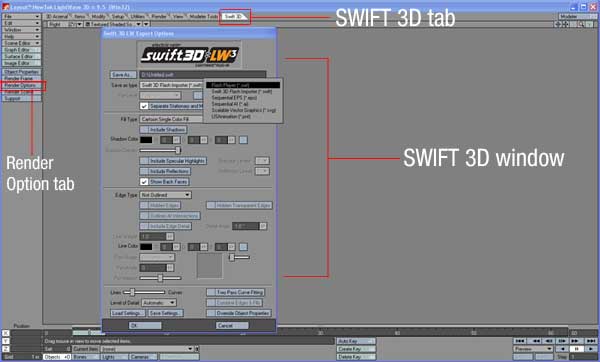
 Once you find 3D Arsenal™ tab inside LightWave 3D®, just click that 3D Arsenal™ tab, and select a pre built 3D scene from template. Selected pre built scene loads into your LightWave 3D®. You just need to type text on Logo’s place so yours text become new logo. You can also edit textures, design of anything in the templates according to your needs. This has the facility to add videos into surfaces of 3D models such as backdrops, screen etc. You can place a dancing girl video with alpha channel in between the virtual sets. Take your video shots with blue/green screen and use pre-made customizable 3D environments provided in 3D Arsenal™. Map your video onto plasma screens, dancing TV’s, video walls and more, to give your productions a real primetime look.
 After mapping logo or video into pre-built scenes you just need to render your project and you will get final 3D animation output… Isn’t it very easy. Instead of creating each thing in 3D you just need to map the required video/logo etc. into pre built templates.